


GM Class 2 Serial Bus Keyless Entry Project - Follow Up to the Double Din Stereo

Thread Starter
Senior Member
Posts like a Supercharger
Joined: May 2016
Posts: 185
Likes: 76

 GM Class 2 Serial Bus Keyless Entry Project - Follow Up to the Double Din Stereo
I'll start by saying this project may have been more work than it was worth, but I've got a $29 remote key less entry with the added benefit of a security system with panic alarm.
I was interested in making my class 2 radio project turn off when the driver'* door opened, rather than turning it off manually or allowing it to time out (10 minutes) and turn off. That required adding the Driver'* Door Module (DDM). It only took adding the Rear Interface Module (RIM) to do key less entry (I already had the matched remote fob and receiver), so I thought I'd give it a try. By adding only one door module, I have all doors unlocking at once (the new relays just trigger the original PDL relay). I would have to add another door module to do progressive unlocking.
I knew I needed some sort of fuse block for the needed relays, but I didn't like the idea of cutting down one from the donor car. Note this one already had most of the fuses, mini and micro relays removed;

Pulling the connector off the back resulted in the perfect size 'fuse block' and donor electrical terminals;

Here is the start of the assembly. DDM is closest, remote receiver is on the top right, RIM is top center;

I ground the mounting tabs off the DDM and RIM modules, as they wouldn't fit on top of the accelerator bracket in original form. Perfect rectangles now that can be attached to one another with Velcro;

Even found back covers for the rear of the 'fuse block' from the under hood fuse blocks in various GM cars;
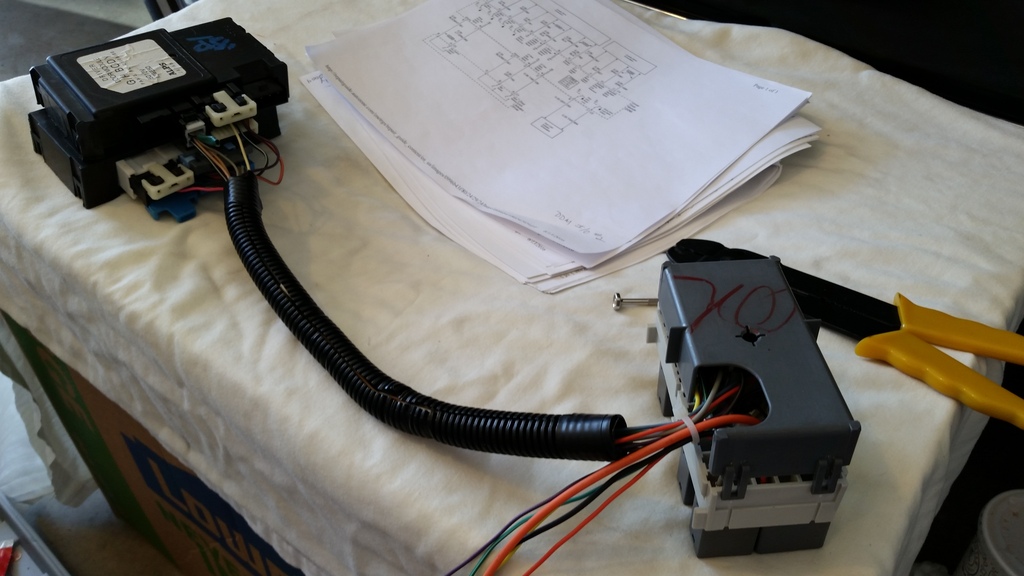
Inside the DDM, the power window section (far right connection) requires a lot of power. I only used a portion of the module;

The remote receiver ended up in the center of the dash where there was a depression for the magnet of a center speaker audio system;

Everything wired and ready to mount;

The final evolution of the 'fuse block' as I was ready to install;

The entire thing installed;

Seems funny to have a nice key fob with original keys that are worn smooth!

I had fear of activating the built in chime system but that hasn't happened. There is a Chime Input on the Dash Interface Module that I haven't enabled or even experimented with. The car'* original chimes (lights on) do activate briefly as the parking lights flash, once for lock and twice for unlocking. The horn will also sound as designed (while flashing the parking lights) if the car is opened after it is locked with the key fob, or the ignition is turned on. The only thing I left out was courtesy light control from the system.
I was interested in making my class 2 radio project turn off when the driver'* door opened, rather than turning it off manually or allowing it to time out (10 minutes) and turn off. That required adding the Driver'* Door Module (DDM). It only took adding the Rear Interface Module (RIM) to do key less entry (I already had the matched remote fob and receiver), so I thought I'd give it a try. By adding only one door module, I have all doors unlocking at once (the new relays just trigger the original PDL relay). I would have to add another door module to do progressive unlocking.
I knew I needed some sort of fuse block for the needed relays, but I didn't like the idea of cutting down one from the donor car. Note this one already had most of the fuses, mini and micro relays removed;

Pulling the connector off the back resulted in the perfect size 'fuse block' and donor electrical terminals;

Here is the start of the assembly. DDM is closest, remote receiver is on the top right, RIM is top center;

I ground the mounting tabs off the DDM and RIM modules, as they wouldn't fit on top of the accelerator bracket in original form. Perfect rectangles now that can be attached to one another with Velcro;

Even found back covers for the rear of the 'fuse block' from the under hood fuse blocks in various GM cars;

Inside the DDM, the power window section (far right connection) requires a lot of power. I only used a portion of the module;

The remote receiver ended up in the center of the dash where there was a depression for the magnet of a center speaker audio system;

Everything wired and ready to mount;

The final evolution of the 'fuse block' as I was ready to install;

The entire thing installed;

Seems funny to have a nice key fob with original keys that are worn smooth!

I had fear of activating the built in chime system but that hasn't happened. There is a Chime Input on the Dash Interface Module that I haven't enabled or even experimented with. The car'* original chimes (lights on) do activate briefly as the parking lights flash, once for lock and twice for unlocking. The horn will also sound as designed (while flashing the parking lights) if the car is opened after it is locked with the key fob, or the ignition is turned on. The only thing I left out was courtesy light control from the system.




Thread Starter
Senior Member
Posts like a Supercharger
Joined: May 2016
Posts: 185
Likes: 76
I definitely have my quirks!
I am fighting the urge to see what this monstrosity might reveal with a GM Tech II tool. I can think of all sorts of 'fun' things I could do if I get one.
The necessity of the GM Tech II tool to match remote fobs was one of the biggest drawbacks to using the LeSabre components. I would rather have used the components from a Century or Regal. I could have avoided the Dock and Lock stereo connection too, though it was easy to use.
Along that line, the car all this came from was an '05 LeSabre Limited with memory settings. The matching stereo has been installed now for a couple months. Imagine my surprise the first time I pressed the remote and saw all my radio presets change to the driver 2 settings!
I am fighting the urge to see what this monstrosity might reveal with a GM Tech II tool. I can think of all sorts of 'fun' things I could do if I get one.
The necessity of the GM Tech II tool to match remote fobs was one of the biggest drawbacks to using the LeSabre components. I would rather have used the components from a Century or Regal. I could have avoided the Dock and Lock stereo connection too, though it was easy to use.
Along that line, the car all this came from was an '05 LeSabre Limited with memory settings. The matching stereo has been installed now for a couple months. Imagine my surprise the first time I pressed the remote and saw all my radio presets change to the driver 2 settings!

Thread
Thread Starter
Forum
Replies
Last Post
eltatertoto
Audio (and aftermarket electronics)
21
Jan 3, 2011 07:50 PM