


Photoshop request


Thread Starter
Senior Member
Posts like a Northstar
Joined: Apr 2007
Posts: 567
Likes: 0
From: Edinboro, PA

 Photoshop request
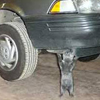
Can anyone help me out... I would like to put this in my signature, but I currently don't have photoshop, or I would do something with it myself. The lighting is a little funny, but I was hoping someone could make it short and wide for my signature, thanks in advance!
You can cut it anywhere or make it look good however you would like. I am open to any ideas, I just appreciate someone taking the time...
PA300618.jpg
Oh and by the way, if you want to dazzle it up with cool effects or add any cool things, go for it....
You can cut it anywhere or make it look good however you would like. I am open to any ideas, I just appreciate someone taking the time...
PA300618.jpg
Oh and by the way, if you want to dazzle it up with cool effects or add any cool things, go for it....

Senior Member
Certified Car Nut
Joined: Oct 2002
Posts: 11,308
Likes: 2
I don't have time to make a cool sig, but FWIW, since the pic is originally square (close to), you have to shrink it by over 300% to get it to fit.
If you wanted just a cropped section you'd have something like this:
PA.jpg
If you wanted that ENTIRE image in a 600x150 area, you'll have no choice but to have this. You'd have to add more to the image of course.
PA2.jpg
You DON'T want to do this:
PA3.jpg
If you wanted just a cropped section you'd have something like this:
PA.jpg
If you wanted that ENTIRE image in a 600x150 area, you'll have no choice but to have this. You'd have to add more to the image of course.
PA2.jpg
You DON'T want to do this:
PA3.jpg
Thread Starter
Senior Member
Posts like a Northstar
Joined: Apr 2007
Posts: 567
Likes: 0
From: Edinboro, PA
I really like the second one, I am going to post another picture, I hope that can go on the left of the second option. I then would like to put 2000 Bonneville SE in maroon in the middle on the top, then underneath list my mods....
Is that alright?
Here'* the left side picture.
PA300612.jpg
The lighting was goofy in each of them.... maybe fix that up a little bit too??
Thanks!!
edit-- or you could just put the text over the first option... with the mods following... whatever works.
Is that alright?
Here'* the left side picture.
PA300612.jpg
The lighting was goofy in each of them.... maybe fix that up a little bit too??
Thanks!!
edit-- or you could just put the text over the first option... with the mods following... whatever works.
Senior Member
True Car Nut
Joined: Jun 2005
Posts: 3,808
Likes: 0
From: Erie Pennsylvania
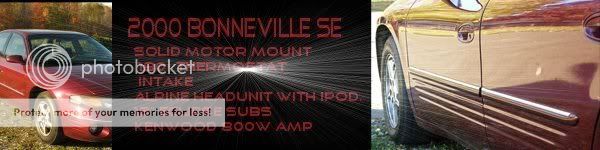
Here'* what I came up with.
Hope you like it,
If you don't, no biggie.
I am no expert and I know some one else here can do better.
Some folks here have some real skills and I certainly don't
Hope you like it,
If you don't, no biggie.
I am no expert and I know some one else here can do better.
Some folks here have some real skills and I certainly don't


Thread
Thread Starter
Forum
Replies
Last Post
PRD2BDF
Detailing & Appearance
14
Jul 4, 2007 06:59 PM