More heat issues, computer help appreciated


Thread Starter
Senior Member
Certified Car Nut
Joined: Oct 2002
Posts: 11,308
Likes: 2


Originally Posted by OLDsman105
Originally Posted by bonnie94sse
Originally Posted by OLDsman105
Originally Posted by bonnie94sse
Originally Posted by opensourceguy
MBM cannot adjust fans..
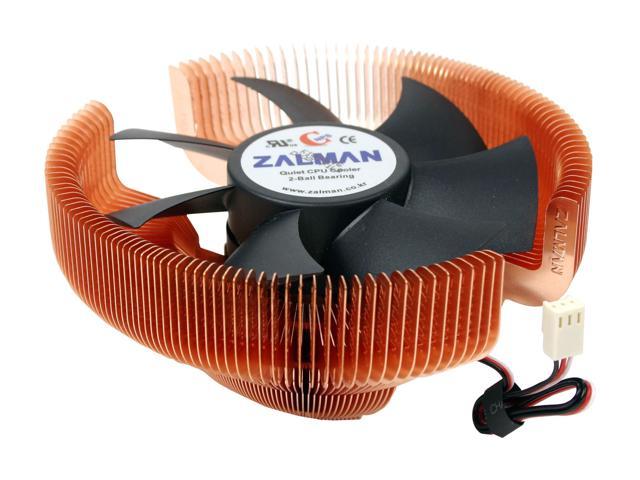
Case fan probably won't do it.. unless you don't have both have at least one intake and one exhaust fan as it is. It turned out, what fixed mine was a new heatsink and fan. I bought a Zalman heat sink, and a generic 120mm fan. Made my temps drop 20*C avg. I sit at around mid-high 30s idle, and low-mid 40s under 100% cpu.
$50 later, I was good to go. Anywhere in the 50*C range is acceptable..
-justin
Case fan probably won't do it.. unless you don't have both have at least one intake and one exhaust fan as it is. It turned out, what fixed mine was a new heatsink and fan. I bought a Zalman heat sink, and a generic 120mm fan. Made my temps drop 20*C avg. I sit at around mid-high 30s idle, and low-mid 40s under 100% cpu.
$50 later, I was good to go. Anywhere in the 50*C range is acceptable..
-justin
I have an intake and exhaust fan on my case. Room for two more if necessary. My CPU fan, at least when I was in the BIOS, was only at 4017rpms. When I start up and am in MBM5, it says it'* at 8200rpms :?
http://www.almico.com/speedfan.php
I used this for years
EDIT: I installed SpeedFan (thanks for the link) and that program also says the CPU fan is above 8000rpms...should I still trust the BIOS'* 4017 reading? Maybe it was only at 4017 because I had not booted the computer....?
The fan might have a varilble speed sensor . Do you know what type of heatsink it is. If it is the stock AMD heatsink you may benefit from a upgrade to a better heatsink. Again 50* c is a tad on the hot side but not life threatening.

Justin, I am sold on that heatsink and 120mm fan...Once I get some money I will invest in that. Thanks you guys for your help.


Senior Member
Certified GM nut
Joined: Jul 2004
Posts: 1,912
Likes: 0
From: New York City
Wait a second
http://www.techwarelabs.com/reviews/...sink_roundup04
http://www.madshrimps.be/?action=getarticle&articID=271
read some reviews before you buy?
Compare BEFORE you buy (William Shatner)
http://www.techwarelabs.com/reviews/...sink_roundup04
http://www.madshrimps.be/?action=getarticle&articID=271
read some reviews before you buy?
Compare BEFORE you buy (William Shatner)

Senior Member
Certified Car Nut
Joined: Jun 2003
Posts: 15,928
Likes: 1
You want to get the computer to act as a "wind tunnel" in a way. 99% of all cases should be setup like this
Front fans suck air in, have good ones here, positive case pressure is always good for dust. A fan on the CPU blowing air off of hte heatsink, not into it, and the fans in the rear, top, or sides blowing out.
Front fans suck air in, have good ones here, positive case pressure is always good for dust. A fan on the CPU blowing air off of hte heatsink, not into it, and the fans in the rear, top, or sides blowing out.
Thread Starter
Senior Member
Certified Car Nut
Joined: Oct 2002
Posts: 11,308
Likes: 2
Originally Posted by BonneMeMN
You want to get the computer to act as a "wind tunnel" in a way. 99% of all cases should be setup like this
Front fans suck air in, have good ones here, positive case pressure is always good for dust. A fan on the CPU blowing air off of hte heatsink, not into it, and the fans in the rear, top, or sides blowing out.
Front fans suck air in, have good ones here, positive case pressure is always good for dust. A fan on the CPU blowing air off of hte heatsink, not into it, and the fans in the rear, top, or sides blowing out.

Senior Member
Posts like a Camaro
Joined: Apr 2005
Posts: 1,071
Likes: 0
Originally Posted by bonnie94sse
Originally Posted by BonneMeMN
You want to get the computer to act as a "wind tunnel" in a way. 99% of all cases should be setup like this
Front fans suck air in, have good ones here, positive case pressure is always good for dust. A fan on the CPU blowing air off of hte heatsink, not into it, and the fans in the rear, top, or sides blowing out.
Front fans suck air in, have good ones here, positive case pressure is always good for dust. A fan on the CPU blowing air off of hte heatsink, not into it, and the fans in the rear, top, or sides blowing out.
Thread Starter
Senior Member
Certified Car Nut
Joined: Oct 2002
Posts: 11,308
Likes: 2
Is there anything better than Arctic Silver 5...what about this "Ceramique" I read about?
Well I originally thought that the CPU fan blew towards the CPU, till he said have one blowing away...got confused for a sec...
I think I actually have a place for a fan in the front of my case....*checking* yep.
Well I originally thought that the CPU fan blew towards the CPU, till he said have one blowing away...got confused for a sec...
I think I actually have a place for a fan in the front of my case....*checking* yep.

Thread Starter
Senior Member
Certified Car Nut
Joined: Oct 2002
Posts: 11,308
Likes: 2
Originally Posted by BonneMeMN
Again,
Front - blow into case
CPU- blow away from CPU
Back, Top, Sides - blow out of case.
Trust me it works.
Front - blow into case
CPU- blow away from CPU
Back, Top, Sides - blow out of case.
Trust me it works.