


How I hacked an iPAC OEM into a 2004 LeSabre


Thread Starter
Senior Member
Posts like a Corvette
Joined: Jan 2007
Posts: 1,451
Likes: 0
From: San Diego, CA

 How I hacked an iPAC OEM into a 2004 LeSabre
Before I go on, I take no responsibility for what you do to your car 
I wanted to add direct input for the iPOD to the wife'* 2004 LeSabre, because the FM modulator type of input is crap.
(Why GM couldn't have added an aux mic type input in a 21st century car is beyond my comprehension, but I digress)
I bought an iPAC-OEM and AB-GM10 harness, designed to tap into the XM system:
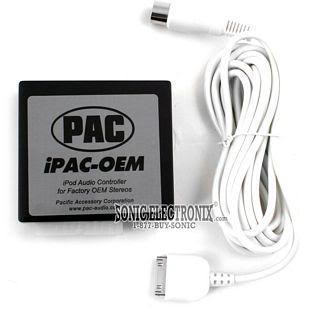
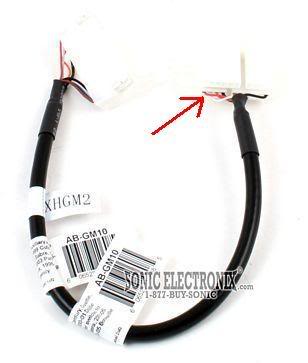
Two problems: I found that this harness is not compatible with '04 LeSabre (and PAC does not make one that is), and even if it were compatible it is designed to effectively replace the XM receiver box and would thus not allow the use of XM.
Anyway, here is my XM receiver box (trunk, driver'* side, behind the mat trunk liner):
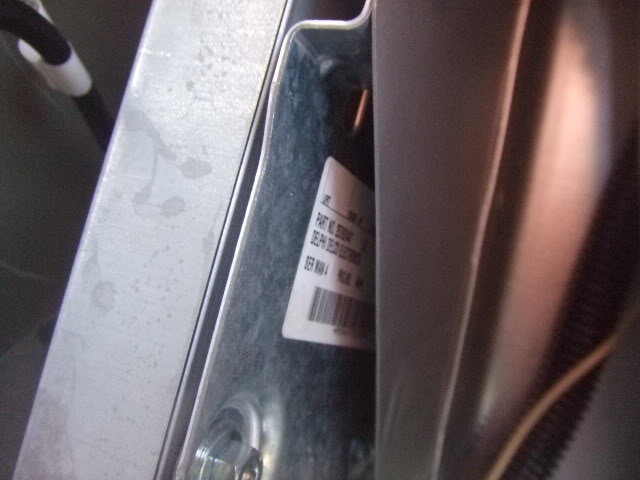
For reference, it says "Delphi Delco Electronics part number 25762447" on it.
I used mini terminal blocks from Radio Shack to make sure my wiring would be secure. With help from hawkjet and an FSM, I figured out what wires to tap into:
ABGM-10-->XM harness in car-->Function
Red-->Brown/wht-->Right + audio
White-->Green/wht-->Left + audio
Orange-->Black/wht-->Common - audio
Black (thick/"dull" insulation)-->Bare-->Drain (prevent ground loops, I think)
Black (thin/"shiny" insulation)-->Purple-->Communications
Blue-->Orange-->+12v Power
Brown-->Black/wht-->Chassis ground
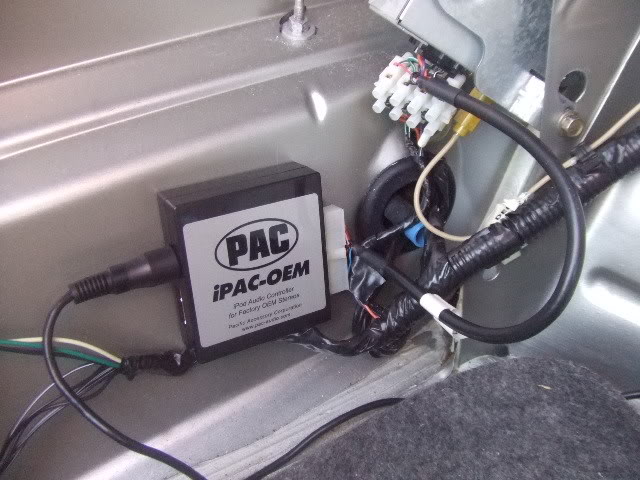
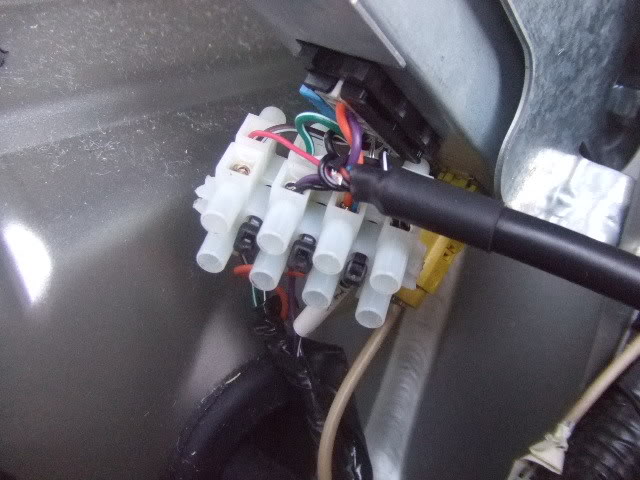
Now then, to do this I had to cut off one of the connectors on the AB-GM10 (see red arrow in second pic above), AND I had to sever the harness connector going into the XM receiver (and strip back some insulation on all these wires). For compactness, I cut the 8-gang terminal block in half and wire-tied it together to make a 2 by 4 array (rather than a 1 by 8 array).
The XM harness wires are "reconnected" through the terminal block. The AB-GM10 wires then go into one side (doesn't matter which). This way, you still have full XM functionality, and all you have to do to remove the whole iPAC-OEM thing is pull the AB-GM10 wires out of the terminal block.
Note that this does NOT give me head unit control of the iPOD. The iPOD connects to the long wire that comes with the iPAC-OEM (see first pic above), that wire stretches into the cabin, and the iPOD is controlled by the iPOD'* own controls. It does charge, though.
To listen to iPOD, I turn on XM radio as source, and tune to the "Radio ID" channel ("blank" channel). The HU display shows some wacky crap like "XYYXZZ"
All the other XM radio channels seem to work as they should. The iPOD will "play over" them if you don't shut it off, though
Total cost, $100 to $120, depending where you buy.
I wanted to add direct input for the iPOD to the wife'* 2004 LeSabre, because the FM modulator type of input is crap.
(Why GM couldn't have added an aux mic type input in a 21st century car is beyond my comprehension, but I digress)
I bought an iPAC-OEM and AB-GM10 harness, designed to tap into the XM system:
Two problems: I found that this harness is not compatible with '04 LeSabre (and PAC does not make one that is), and even if it were compatible it is designed to effectively replace the XM receiver box and would thus not allow the use of XM.
Anyway, here is my XM receiver box (trunk, driver'* side, behind the mat trunk liner):
For reference, it says "Delphi Delco Electronics part number 25762447" on it.
I used mini terminal blocks from Radio Shack to make sure my wiring would be secure. With help from hawkjet and an FSM, I figured out what wires to tap into:
ABGM-10-->XM harness in car-->Function
Red-->Brown/wht-->Right + audio
White-->Green/wht-->Left + audio
Orange-->Black/wht-->Common - audio
Black (thick/"dull" insulation)-->Bare-->Drain (prevent ground loops, I think)
Black (thin/"shiny" insulation)-->Purple-->Communications
Blue-->Orange-->+12v Power
Brown-->Black/wht-->Chassis ground
Now then, to do this I had to cut off one of the connectors on the AB-GM10 (see red arrow in second pic above), AND I had to sever the harness connector going into the XM receiver (and strip back some insulation on all these wires). For compactness, I cut the 8-gang terminal block in half and wire-tied it together to make a 2 by 4 array (rather than a 1 by 8 array).
The XM harness wires are "reconnected" through the terminal block. The AB-GM10 wires then go into one side (doesn't matter which). This way, you still have full XM functionality, and all you have to do to remove the whole iPAC-OEM thing is pull the AB-GM10 wires out of the terminal block.
Note that this does NOT give me head unit control of the iPOD. The iPOD connects to the long wire that comes with the iPAC-OEM (see first pic above), that wire stretches into the cabin, and the iPOD is controlled by the iPOD'* own controls. It does charge, though.
To listen to iPOD, I turn on XM radio as source, and tune to the "Radio ID" channel ("blank" channel). The HU display shows some wacky crap like "XYYXZZ"
All the other XM radio channels seem to work as they should. The iPOD will "play over" them if you don't shut it off, though
Total cost, $100 to $120, depending where you buy.
Thread Starter
Senior Member
Posts like a Corvette
Joined: Jan 2007
Posts: 1,451
Likes: 0
From: San Diego, CA
Originally Posted by lewis26
Thanks for all your help!
So if just tapped into the left and right audio signals with a 3.5mm jack, would i get audio?
So if just tapped into the left and right audio signals with a 3.5mm jack, would i get audio?

Senior Member
Posts like a Turbo
Joined: Apr 2007
Posts: 360
Likes: 0
From: Santa Rosa, CA
To add some clarification to Andrew'* post...
I have been working with Andrew (agrazela) on this. When he originally hooked it up, it didn't work. So as an interim step (and to ascertain where the problem might be) I had him wire it in the manner he described. This proved the audio worked.
The iPAC-OEM is bypassed in this configuration and is only providing a charger for the iPod.
Ultimately the iPAC-OEM would be wired in series with the iPod and would provide some control from the head unit and steering wheel buttons. In that case, the XM radio would have to be disconnected. I suspect that last piece was what I didn't know and was the reason it didn't work when Andrew originally hooked it up.
There have been some that wanted to connect an iPod AND still have the use of the XM. It looks like it my be a tolerable solution to do what Andrew has done here (without the need for the iPAC-OEM). That way you can use your XM radio and when you want to listen to the iPod, you tune to a "blank" channel and play the iPod. also note that when wired in this manner, you could accidentally get both the iPod and XM playing at the same time.
I have been working with Andrew (agrazela) on this. When he originally hooked it up, it didn't work. So as an interim step (and to ascertain where the problem might be) I had him wire it in the manner he described. This proved the audio worked.
The iPAC-OEM is bypassed in this configuration and is only providing a charger for the iPod.
Ultimately the iPAC-OEM would be wired in series with the iPod and would provide some control from the head unit and steering wheel buttons. In that case, the XM radio would have to be disconnected. I suspect that last piece was what I didn't know and was the reason it didn't work when Andrew originally hooked it up.
There have been some that wanted to connect an iPod AND still have the use of the XM. It looks like it my be a tolerable solution to do what Andrew has done here (without the need for the iPAC-OEM). That way you can use your XM radio and when you want to listen to the iPod, you tune to a "blank" channel and play the iPod. also note that when wired in this manner, you could accidentally get both the iPod and XM playing at the same time.
Senior Member
Posts like a Turbo
Joined: Apr 2007
Posts: 360
Likes: 0
From: Santa Rosa, CA
Originally Posted by lewis26
Thanks for all your help!
So if just tapped into the left and right audio signals with a 3.5mm jack, would i get audio?
So if just tapped into the left and right audio signals with a 3.5mm jack, would i get audio?
Thread Starter
Senior Member
Posts like a Corvette
Joined: Jan 2007
Posts: 1,451
Likes: 0
From: San Diego, CA
I know I'm not getting full functionality from the iPAC-OEM this way. But wife happy == me happy 
Maybe all you need is to tap the audio wires (and maybe power and ground if you want to charge the iPOD?)...if that works, let us know!
Heck, I've still got the old FM modulator (Monster Cable brand) sitting around somewhere...maybe I'll hack that sucker up and try it myself. Could be a cheaper way to get this "limited" functionality. But where to get a pinout of the iPOD'* connector?
Maybe all you need is to tap the audio wires (and maybe power and ground if you want to charge the iPOD?)...if that works, let us know!
Heck, I've still got the old FM modulator (Monster Cable brand) sitting around somewhere...maybe I'll hack that sucker up and try it myself. Could be a cheaper way to get this "limited" functionality. But where to get a pinout of the iPOD'* connector?
 There are iPod charges available if that is what you need.

Member
Posts like a V-Tak
Joined: Mar 2008
Posts: 41
Likes: 0
From: Darien, Illinois
Okay, Now do 3.5mm cables have a common audio cable in them too?
Im just trying to figure out exactly what cable I will need. I'm going to be doing this, but don't want to be in over my head when i try it out.
The charger isnt really an issue. I'm going to put in a hardwired solution from the cig lighter.
Thanks for all your help andrew and cris. It'* really appreciated!
-Mike
EDIT: I found the pinout of those jacks online, and it goes left on the tip, right in the middle, and ground on the back of the jack. Would i use the ground as the audio common?
Im just trying to figure out exactly what cable I will need. I'm going to be doing this, but don't want to be in over my head when i try it out.
The charger isnt really an issue. I'm going to put in a hardwired solution from the cig lighter.
Thanks for all your help andrew and cris. It'* really appreciated!
-Mike
EDIT: I found the pinout of those jacks online, and it goes left on the tip, right in the middle, and ground on the back of the jack. Would i use the ground as the audio common?
Senior Member
Posts like a Turbo
Joined: Apr 2007
Posts: 360
Likes: 0
From: Santa Rosa, CA
Originally Posted by lewis26
I found the pinout of those jacks online, and it goes left on the tip, right in the middle, and ground on the back of the jack. Would i use the ground as the audio common?
The wires are delicate so if you are not used to working with small parts, you may be in for some frustration. I don't want to discourage you, so just be forewarned.
Member
Posts like a V-Tak
Joined: Mar 2008
Posts: 41
Likes: 0
From: Darien, Illinois
Okay I think i got it. Now i need to wire it in parallel, correct?
Does that mean i can just cut the original cable, and add the new cable in in a t-shaped connection? Or is there another way I need to do this?
I feel like such a noob
How badly i want direct input, outweighs the small cables
Does that mean i can just cut the original cable, and add the new cable in in a t-shaped connection? Or is there another way I need to do this?
I feel like such a noob
How badly i want direct input, outweighs the small cables